
— Smart Lessons. Teachers, augmented.
- Project DNA at Nord Anglia Education, the world's largest private school network.
- Real-time check-ins, so a teacher can see how every student is doing.
- Workshops, research and regular reviews with teachers.
- Client

The short version
A 30-second read
The problem
Teachers in a class of 25 couldn't see how each student was really doing until marking, long after they could help.

What I did
I led UX and research: a problem explorer workshop, a research plan around very limited access to children, paper prototypes, then designs reviewed with teachers every few weeks.

What changed
Check-ins for mood, confidence and knowledge, a real-time view for teachers, and working features in classrooms within weeks.
- 7schools in the pilot
- 30teachers as critical friends
- 3kinds of check-in
01/ Summary
- — Services
- UX and user research
- Workshop facilitation
- Research planning
- Paper prototyping
- Interaction design
- Design system
- — Deliverables
- A problem explorer workshop, from problems to epics
- A research plan and map of who we could reach
- User stories for teachers and students
- Paper prototypes, then designs for the teacher and student tools
- Regular design reviews with teachers
- A story map for the lesson tool
- — Outcomes
- Working features in teachers' hands within weeks, after testing with prototypes first
- Two-week sprints: prototype, test and deliver, every fortnight
- The company's first design system, starting with in-classroom tools and growing with the product
- Teachers shaping the product through regular reviews, from May to August
02/ Understanding the problem
- 7schools in the pilot
- 30teachers in the critical friends group
- 3kinds of check-in
- 2year groups first: Years 3 and 7
Supplement, don't replace
Most adaptive learning tools try to replace the teacher. Nord Anglia wanted the opposite: technology that makes planning, teaching and assessing more efficient, and supports the classroom rather than virtualising it. The team called it the augmented classroom.
What teachers told us
- It's hard to keep track of 20 or more students' needs at once.
- Marking after the lesson is too late to respond, and drains time.
- How a student feels has to be guessed from their behaviour.
- There's no way to see the class's progress at a glance.
Teachers don't need replacing. They need to see how every student is doing, while there's still time to help.
03/ Problem explorer workshop
- Explain the problem. What does it mean to each of you? One thought per sticky note, kept short.
- Sail the boat. What's pushing us forward, and what's holding us back? Then group, remove duplicates and vote.
- Ask “How might we…?” The top-voted problems, turned into questions we could answer, and grouped into themes.
- Generate ideas. Quantity over quality, for the top questions in each theme. Then vote with gut feeling, not scrutiny.
- Write big idea sheets. Three each, with plenty of detail on what success would look like.
- Weigh effort against impact. A straw poll, then every idea placed by how hard it is and how much it matters.
- Break it into epics. The high-impact ideas, broken down into work the team could deliver.
04/ Research, with very little access
Very little time with children
Access to 5 to 16-year-olds would be extremely limited: around six sessions over six months.
Teachers already stretched
Teachers and students were overwhelmed by change after lockdown.
Parents wary of screens
There was big pushback from parents about iPad use after lockdown.
An existing tech landscape
No standard learning platform across schools, but Microsoft Teams and Office 365 everywhere.
A critical friends group
30 teachers as sounding boards, alongside a core group of teachers and the curriculum team.
A warm group in Hong Kong
Teachers we could reach weekly, careful never to waste their time.
Proxy users
Consultant teachers and education experts standing in where children couldn't.
Fit what's there
Sign-in through the accounts every student already had, so nothing new to learn first.
05/ Check-ins
Mood
How is each student feeling, right now and over the course of the lesson?
Lesson confidence
Who's comfortable, and who's quietly struggling, at a glance.
Knowledge
Quick multiple-choice and free-text questions, marked in the moment.
For teachers: mission control
A real-time view of the whole class, and of each student, as the lesson happens. How mood and confidence change through the lesson, and how answers come in, so the teacher can step in at the right moment.
For students: a quiet hand up
A simple way to tell the teacher how they're getting on, one to one, even in a class of more than 25, in school or at home. Answering when asked first, then letting them speak up unprompted later.
06/ From paper to product
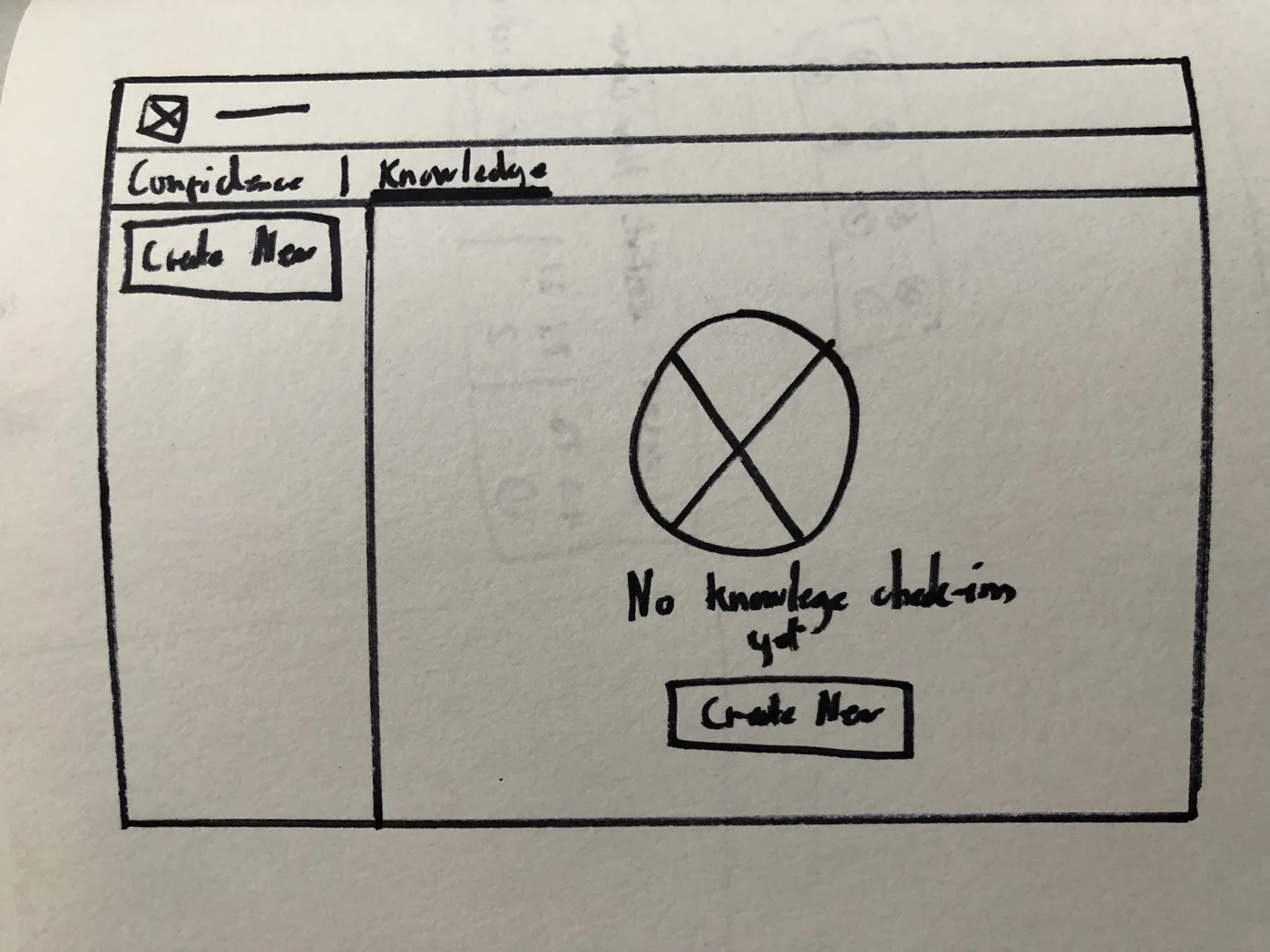
Paper first: the teacher's view before any check-in has been made. 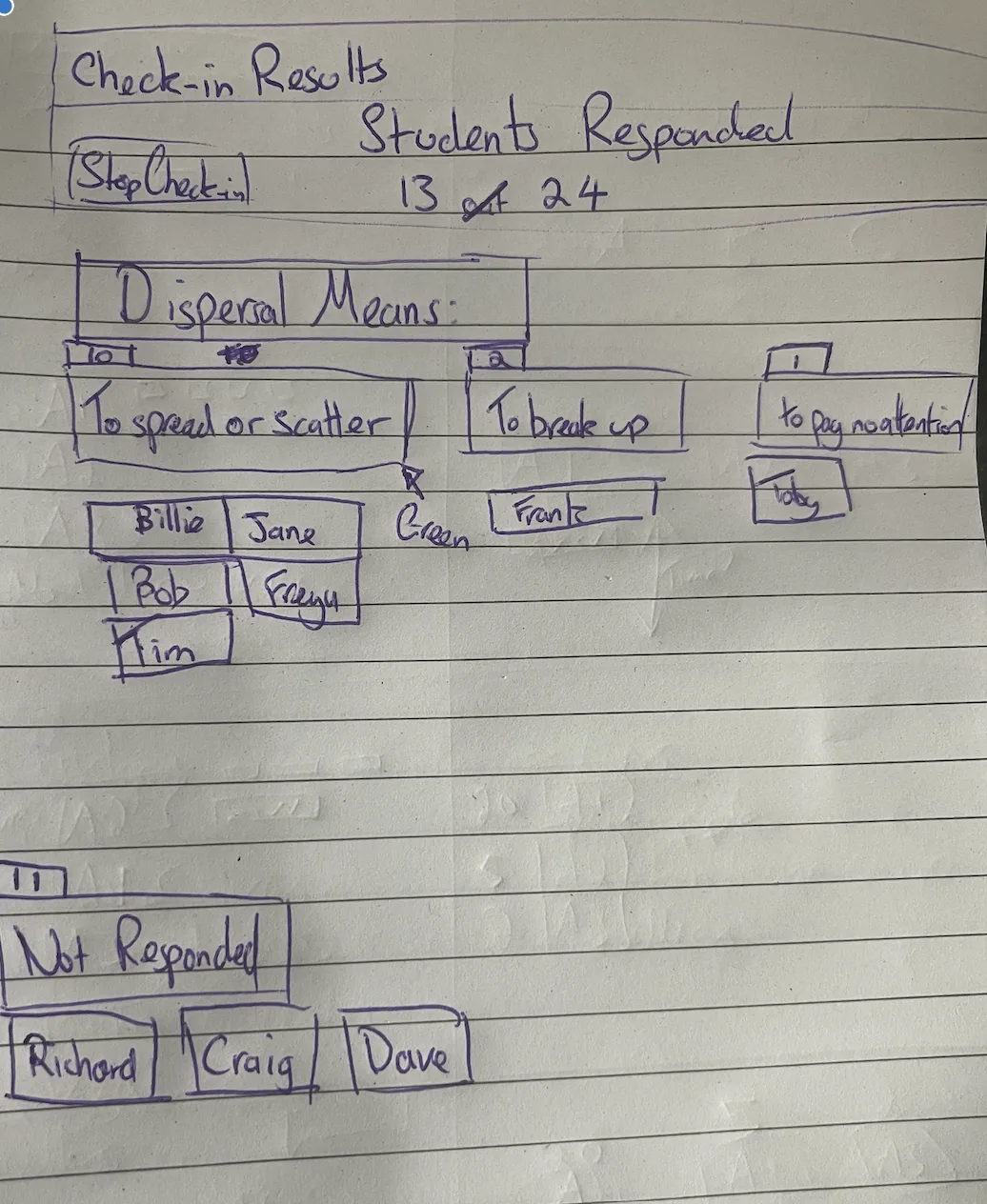
Results grouped by answer, so the teacher sees who needs help, and who hasn't answered yet.
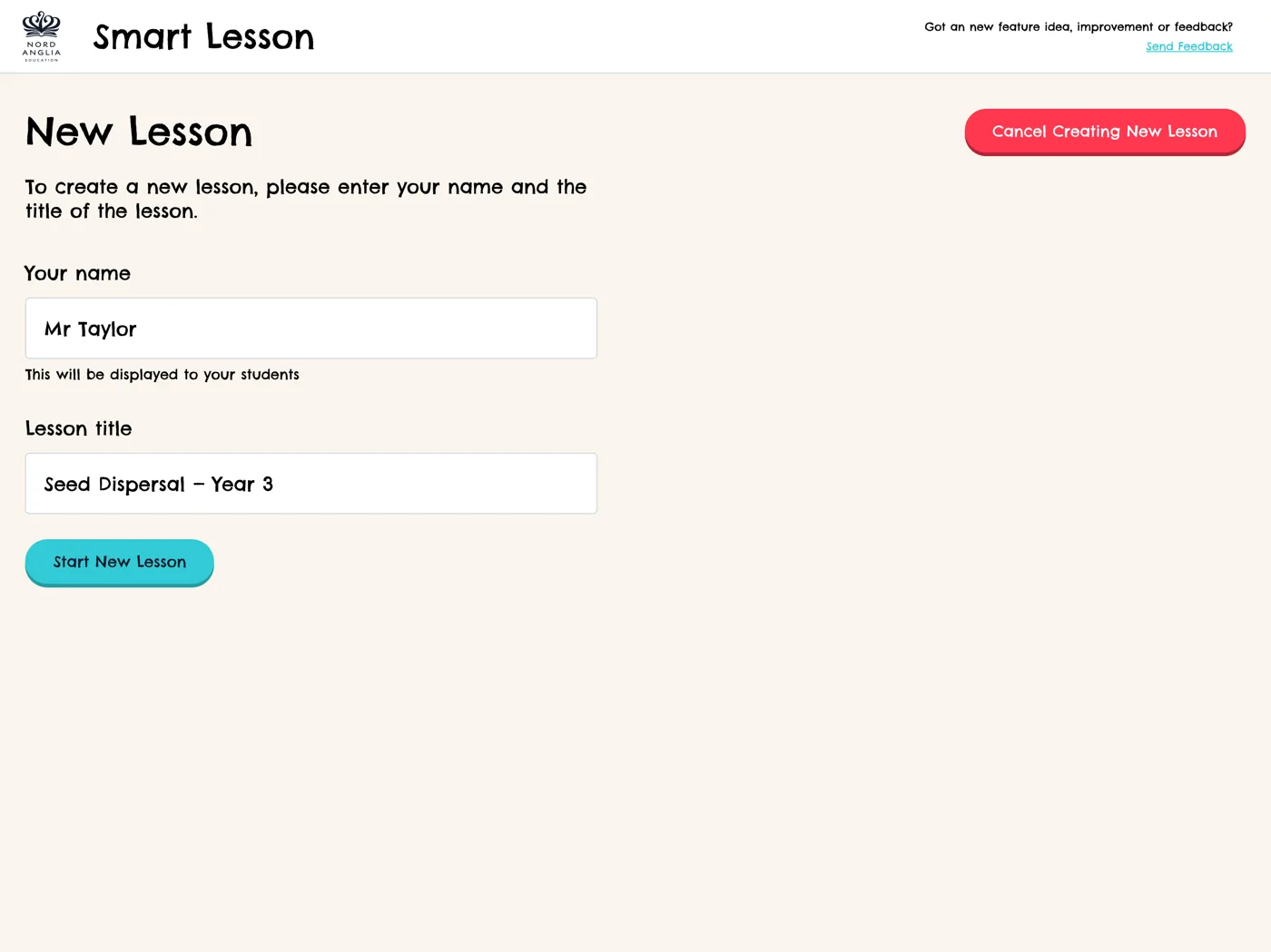
Starting a lesson: just a name and a title. 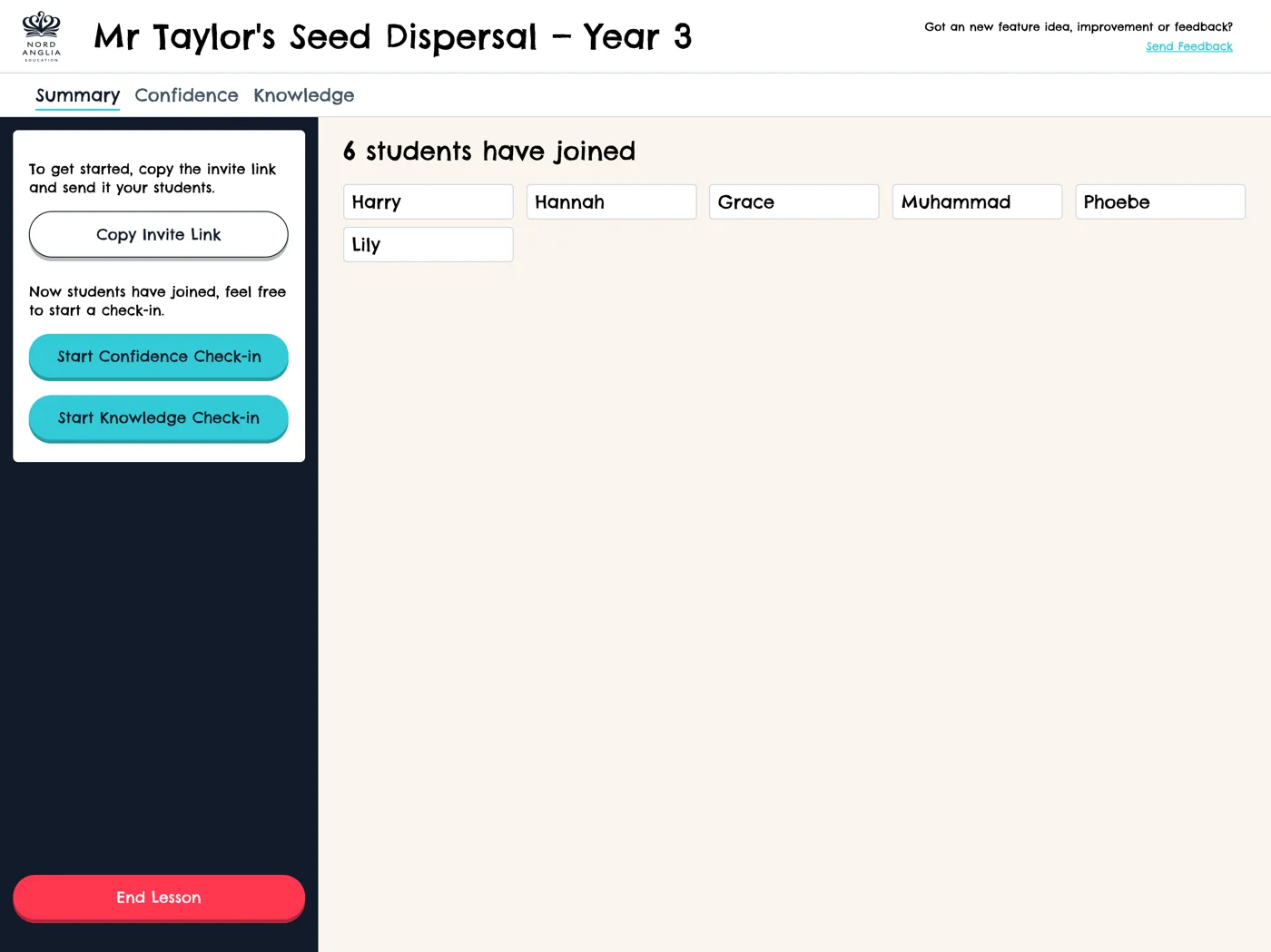
Students join, and the teacher can start a confidence or knowledge check-in.
07/ Reviews with teachers
Free-text questions
Asked for in one review, designed and back in front of teachers in the next.
FromKnowledge check-ins could only be right or wrongToFree-text questions, typed answers and teacher marking
“What about an ‘I don't understand the question’ or help function?”
Feedback on the student view.
“If the teacher has a word count, shouldn't the student see theirs too?”
Feedback on free-text answers.
“Great work doesn't feel like a mark.”
Feedback on how marks reached students.
08/ A design system from day one
Built as we went
Nord Anglia had no design system. We started one with the in-classroom tools, built as a component library in Storybook, and let it evolve with the product, taking an agile, iterative approach to design and development together.
Mapped for what came next
A story map for the lesson tool laid out how check-ins would grow into lesson sequences, with pathways for students working at different levels.
What got built
For students
Join a lesson, then confidence and knowledge check-ins, a moment to listen to the teacher, and a thank-you when they've answered.
For teachers
Create a lesson, run it from a live dashboard, see confidence and knowledge as answers arrive, and plan sequences of lessons.
Lesson slides
Cover, image, and image-and-text slides, with lesson content managed in a content system (Sanity).
Live, in the room
Answers reached the teacher's dashboard in real time, while there was still time to help.
A component library
The shared components in Storybook, where design and engineering could see and test every piece.
A lesson kit
Branded Word and PowerPoint templates, in portrait and landscape, so lesson resources looked like they belonged together.
Alongside the lesson tool, a separate SLT check-in app, for each school's senior leadership team, used the same approach.
09/ Outcomes
What it delivered
Working features
In teachers' hands within weeks, after testing with prototypes first.
Two-week sprints
Prototype, test and deliver, every fortnight.
The company's first design system
Starting with in-classroom tools and growing with the product.
Teachers shaping the product
Through regular reviews, from May to August.
Available from January 2027
Looking for a design leader?
I take on contract roles as a design consultant, head of design or fractional design lead, across product, service and design systems. Remote anywhere, or hybrid across the UK.